
Tools
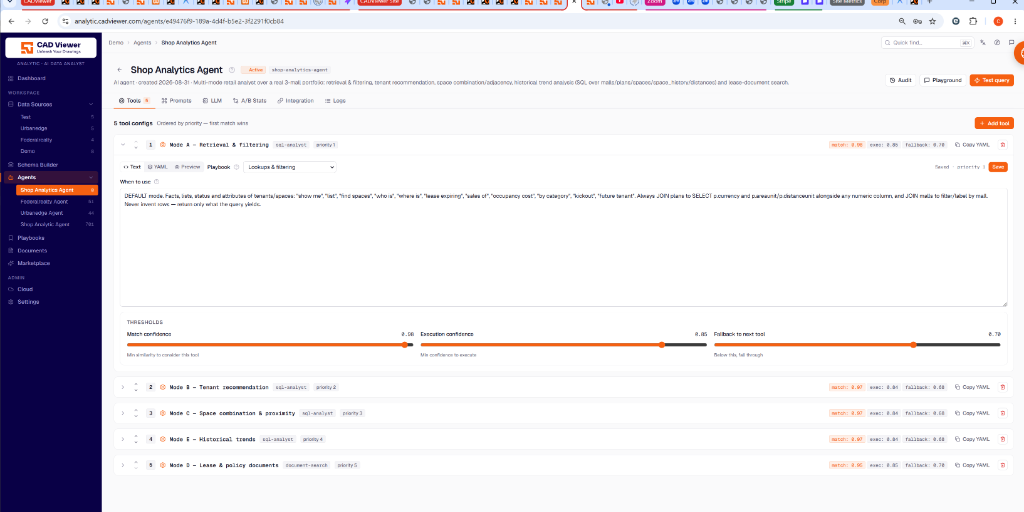
This section controls what your agent is capable of doing (e.g., querying SQL or searching documents). An agent can have one tool added several times, each instance binding its own playbook and schema group. This is how an agent gets distinct operating modes.
Reference Set-up: Shop Analytics Agent
As seen in the example, the Shop Analytics Agent is set up as a multi-mode retail analyst using 5 ordered tool configurations. Tool selection uses a “first match wins” based on priority and thresholds.
Operating Modes (Tool Configs)
- Mode A - Retrieval & Filtering: (Priority 1) SQL analyst for finding specific spaces and filtering status/attributes. Bound to its own playbook for quick filtering.
- Mode B - Tenant recommendation: (Priority 2) SQL analyst tuned for matching tenants to available space.
- Mode C - Space combination & proximity: (Priority 3) SQL analyst for analyzing adjacent and combinable retail spaces.
- Mode E - Historical trends: (Priority 4) SQL analyst designed for analyzing past occupancy and revenue data.
- Mode D - Lease & policy documents: (Priority 5) Document search tool for analyzing PDF and text lease documents.
Thresholds
For each tool, you can adjust:
- Match confidence: Minimum semantic similarity to the query to even consider using this tool.
- Execution confidence: Minimum confidence required to execute the tool automatically.
- Fallback to next tool: If confidence falls below this threshold, the agent will skip this tool and evaluate the next one in the priority list.