
Cloud
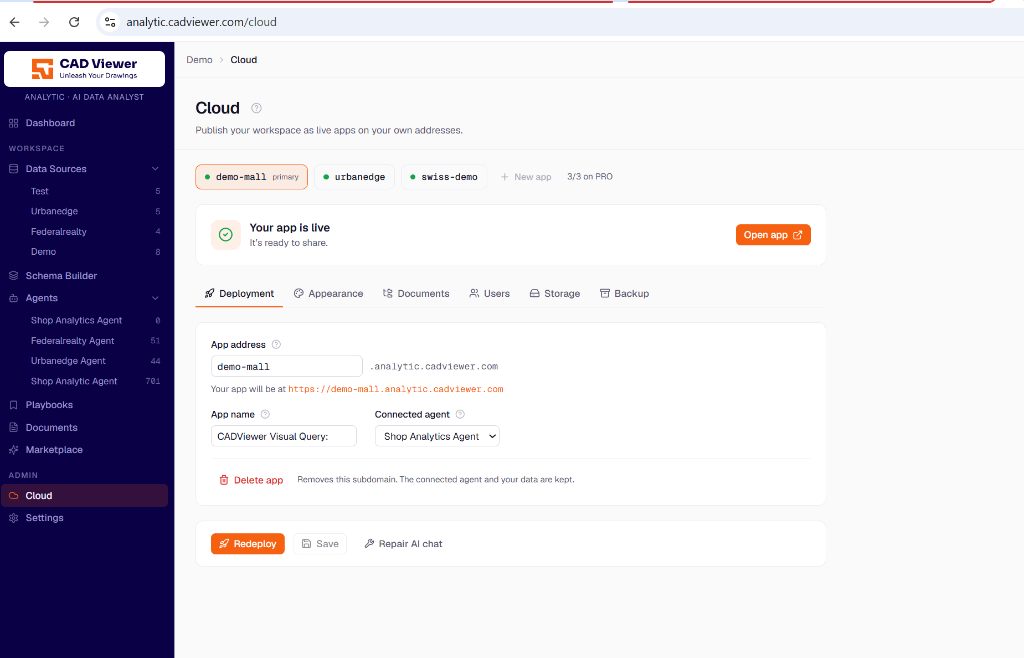
The Cloud section is where users can publish their workspace as live apps on their own endpoints.
Deployment Setup
In the Deployment tab, you configure the core identity and routing of your application:
- App address: Defines the subdomain where your app will live (e.g.,
demo-mall.analytic.cadviewer.com). - App name: The name displayed in the browser and application headers.
- Connected agent: The specific AI agent bound to this deployment. This agent handles all visual queries and data lookups for the users visiting the app.
Actions
- Save: Saves your changes without deploying them. Saved changes only go live on the next redeploy.
- Redeploy: Pushes the saved configuration and restarts the frontend application to apply the changes to your live app immediately.
- Repair AI chat: A diagnostic tool that re-registers the host app link and mints a fresh AI key (fixes an AI chat returning 401/424 errors) instantly, without requiring a full redeploy.
Additional Cloud Tabs
Beyond deployment, you can configure other aspects of your app:
- Appearance: Configure branding, the AI assistant panel, picture-in-picture modes, color accents, and starting coordinates (as detailed in the Settings section).
- Documents & Storage: Manage the location and cache of user uploads and converter files. If they map to the same directory, the cache cannot be flushed to prevent accidental deletion of real files.
- Backup: Downloads a ZIP archive of this app, including its appearance, users, and documents (passwords and secret keys are securely excluded). Note that a restored appearance only goes live on the next redeploy.