
Documents
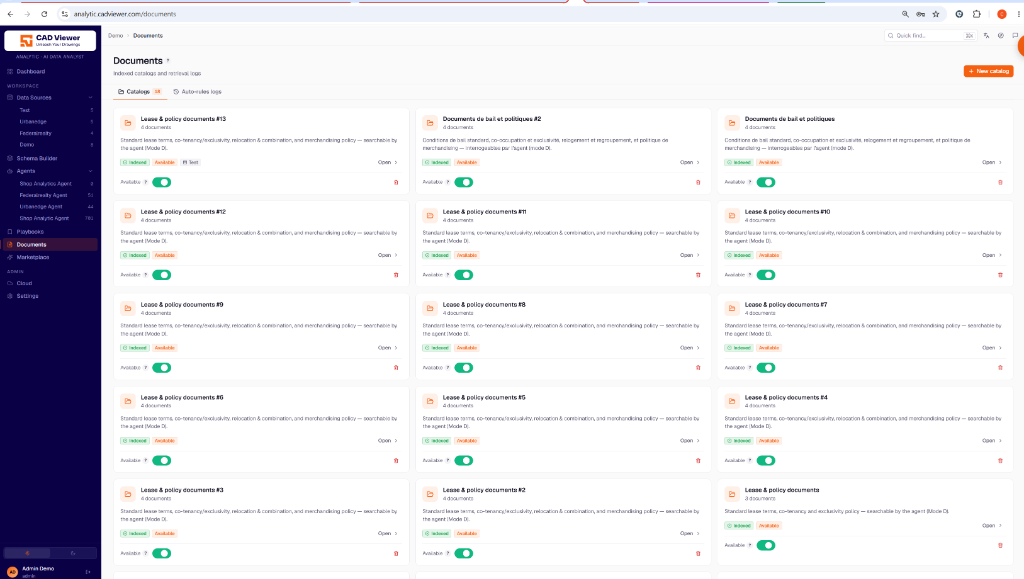
The Documents pane is where you process unstructured data (like PDFs, markdown files, and policies) into the Qdrant vector database for Retrieval-Augmented Generation (RAG).
Catalogs
You organize documents into Catalogs. A catalog serves as a logical grouping of documents that can be searched by an AI agent.
- Indexing & Availability: You can toggle whether a catalog is available to agents. Enabling availability triggers a background job to chunk and index the documents into the Qdrant vector database. Disabling it removes the vector index.
- Re-indexing: If you update your embedding models or chunking strategies, you can easily queue a full re-index of the entire catalog.
Linking Catalogs
Catalogs can be associated in two primary ways:
- To an Agent Tool: As seen in the Agent Tools configuration, a
document-searchtool is bound directly to a specific catalog (e.g., Mode D searching “Lease & policy documents”). - To a Data Source: You can link a catalog directly to a database schema. This allows the SQL-analyst agent to cite business documentation that matches the tables it queries, enriching the data analysis with qualitative context from your documents.
Auto-rules and Logs
The Auto-rules logs tab allows you to monitor the automated background jobs that index and process your files, providing full observability over what has been successfully vectorized and what might require attention.