
Playbooks
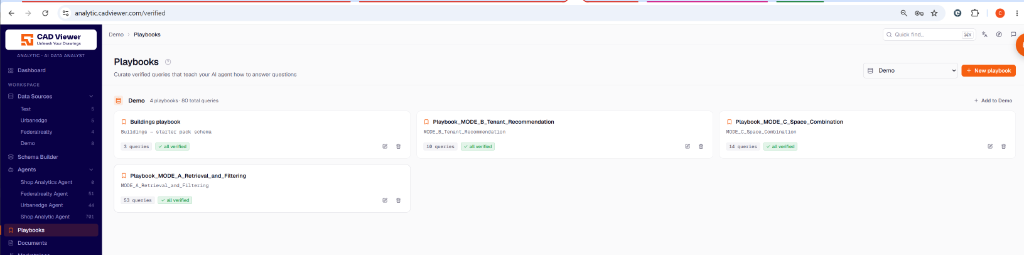
Playbooks let you curate verified queries to teach your AI agent how to answer questions correctly. They contain pairs of natural language questions and the expected SQL queries.
Verified Queries
Playbooks act as memory layers for an agent. When a user asks a question, the agent searches its playbooks for semantically similar questions before writing its own SQL.
- Verified Queries: Once a query is verified, it is embedded into the vector index and becomes available to the agent for future lookups.
- Bulk Verify: You can review all pending questions asked by users and perform a “Bulk verify” to approve them and add them to a playbook.
Structuring Playbooks
You can create multiple playbooks, often aligning them 1:1 with your schema groups. For instance, you could have a “Retrieval and Filtering” playbook and a separate “Tenant Recommendation” playbook, assigning each to their respective tools in the agent configuration.
{{ … }}
Playbook Implementation: Verified Queries
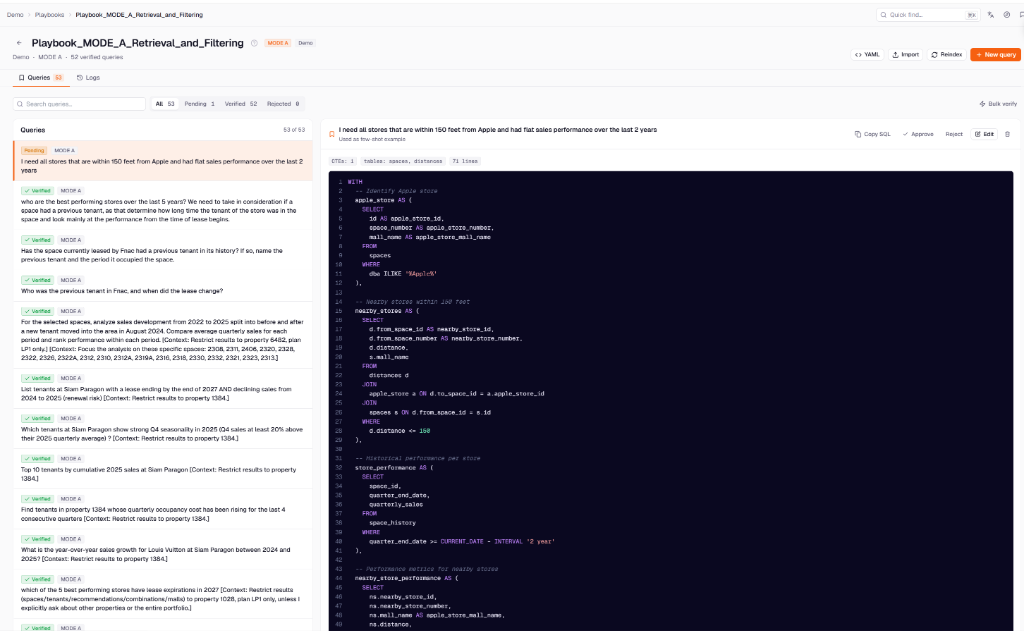
When you open a specific playbook (e.g., Mode A - Retrieval and Filtering), you enter the playbook editor. This is where you actually train your agent by mapping natural user questions to the exact SQL queries required to answer them.
Building Verified Queries
A verified query consists of the natural language question (e.g., “I need all stores that are within 150 feet…”) paired with its exact, perfect SQL representation.
- Pending vs. Verified: Queries enter the system as Pending when agents encounter questions they aren’t completely sure about. You can review these on the left pane.
- Approve / Reject / Edit: As an administrator, you select a pending query, inspect the SQL, and either Approve it (turning it into a verified query) or Edit it to correct the SQL before saving.
- Used as few-shot example: Verified queries act as “few-shot” examples. When the AI agent encounters a similar user question in the future, it retrieves these verified examples from its vector index to construct the perfect SQL query.
Options and Actions
- New query: Manually insert a pair of question/SQL to proactively train the agent on complex edge cases.
- Import / YAML: Import a large batch of verified queries using YAML format, which is extremely useful when migrating environments or initializing a new tenant.
- Reindex: Forces the vector database (Qdrant) to re-embed and index all queries in the playbook, ensuring the agent’s semantic search is up-to-date.
- Bulk verify: Quickly approve all pending queries in the current filtered view.