
Settings
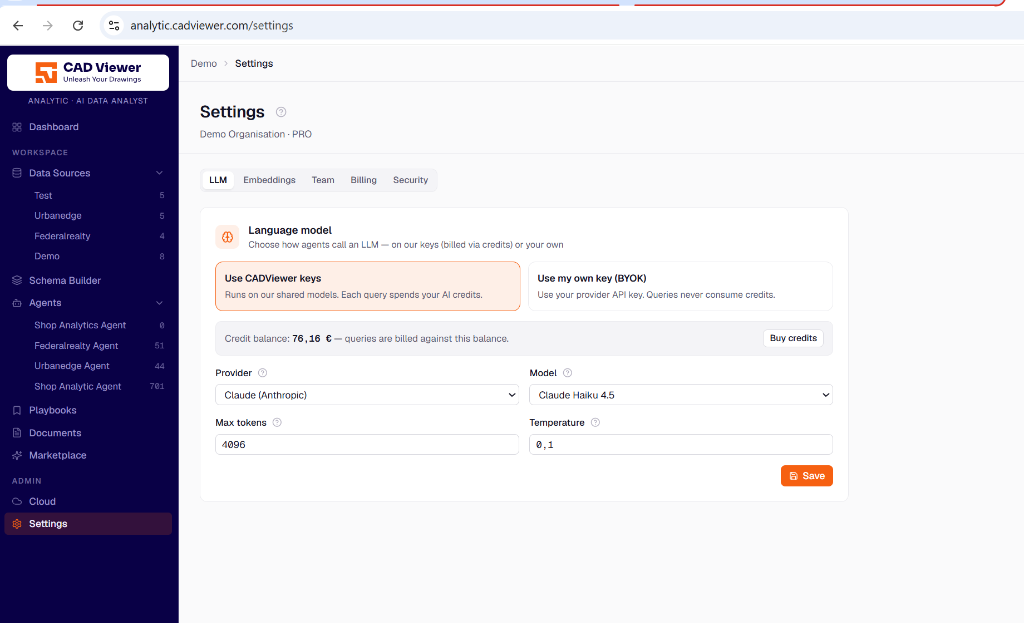
Manage your tenant-wide configuration, billing, and API integrations in this section.
Language Model (LLM) Configuration
In the LLM tab, you configure the default AI model used by all your agents (unless an agent has a specific override). You have two primary billing options for your AI usage:
- Use CADViewer keys: By default, your agents will run using the platform’s shared API keys. Every query consumes AI credits against your Credit balance. You can purchase additional credits via the “Buy credits” button.
- Use your own key (BYOK): If you prefer, you can bring your own API key (e.g., from OpenAI or Anthropic). When using BYOK, your queries are processed directly through your provider account and will never consume CADViewer AI credits.
For either option, you can fine-tune the Provider, Model (e.g., Claude Haiku 4.5), Max tokens, and Temperature (lower values result in more deterministic answers).
Embeddings
Configure the embedding models used by Qdrant to vectorize your documents and playbooks. Like the LLM, you can use CADViewer’s default embedding models or configure your own.
Team and Billing
Manage your organization’s members, their roles, and handle subscriptions, invoices, and credit purchases under the Team and Billing tabs.
Security (Authentication Keys)
The Security tab is where you generate and manage authentication keys for backend integrations. If you are integrating CADViewer agents directly into your own enterprise systems via the API (as seen in the Agent Integration pane), you will generate the required API keys here to securely authenticate those requests.