
CADViewer Doctor (System Health)
CADViewer Doctor (System Health)
When setting up the server on a new environment, the CADViewer Doctor pane acts as your first line of defense against permission errors and missing dependencies.
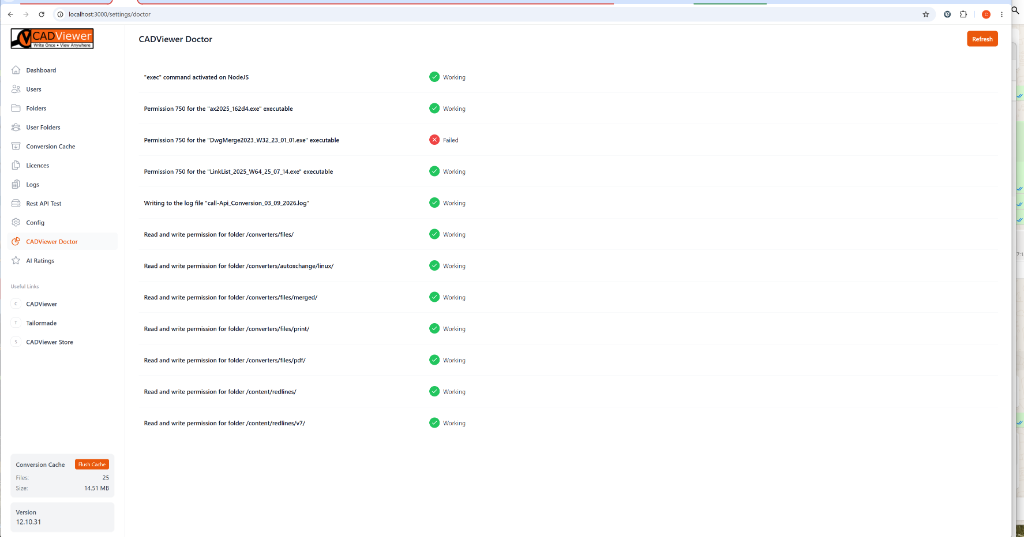
The Doctor automatically runs a suite of diagnostic tests, checking:
- NodeJS execution capabilities (verifying the exec command is available).
- Binary Executable Permissions: Ensuring converters like AutoXchange, DwgMerge, and LinkList have the correct permissions.
- Directory Read/Write Access: Ensuring the Node.js process has write access to critical folders like /converters/files/, /converters/files/pdf/, and /content/redlines/.
Any failures (such as the DwgMerge permission error shown in the example) are flagged with a red cross, allowing you to quickly identify and resolve host configuration issues.