
Folder Management
Folder & File Management
The Folders pane acts as a built-in file explorer for your Conversion Server. It allows administrators to directly view, manage, and modify the physical directory structures without needing FTP or shell access to the host server.
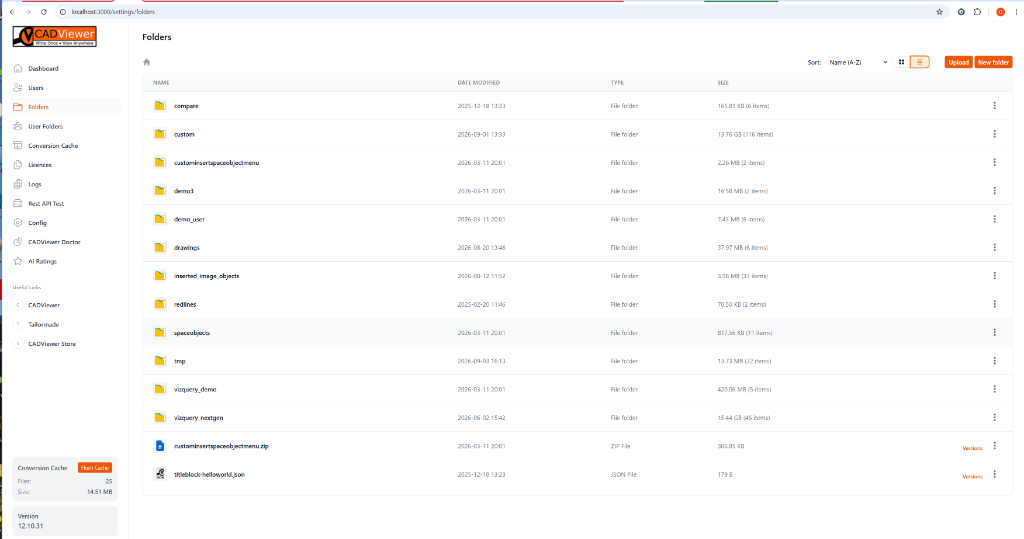
This graphical explorer provides:
- Directory Overview: A clean list view of all root folders (like drawings, mp, edlines, etc.) alongside files.
- Detailed Metadata: Instantly view the Date Modified, Type (e.g., File folder, ZIP File, JSON File), and Size (including item counts for directories).
- Sorting & Views: Toggle between List and Grid views, and sort alphabetically or by modification date.
- Direct Uploads & Creation: Use the Upload and New folder buttons in the top right to instantly push new CAD files to the server or scaffold out new tenant directory trees.
- File Versions: Files support a “Versions” tag, helping you keep track of overwritten CAD drawings or updated configuration files.
User Folders (Multi-Tenant Management)
The User Folders view is a specialized variant of the file explorer designed specifically for multi-tenant environments.
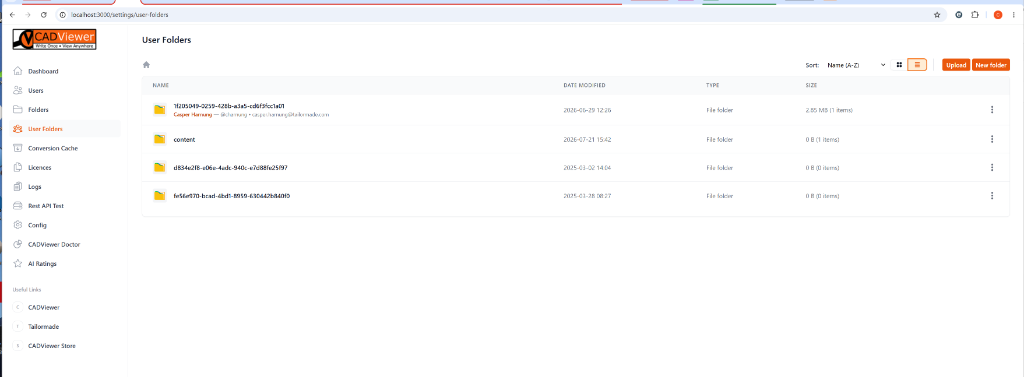
Instead of showing root-level directories, this pane maps isolated tenant directories (which use secure UUIDs) directly back to the registered User Profiles. By expanding a UUID folder, administrators can instantly see which user (e.g., Casper Hornung - casper.hornung@tailormade.com) owns that specific physical slice of the server, making tenant auditing and data management effortless.