
Supported Entities
DwgMerge is designed to designed to merge JSON content into AutoCAD DWG files. The syntax of the definition of content follows the structure of the output as defined in Tailor Made Software data extraction products LinkList 2023 and DwgList 2023.
Sample Entities used in this section
Note: You can download a sample DWG and JSON that can be used as sample input for DwgMerge.
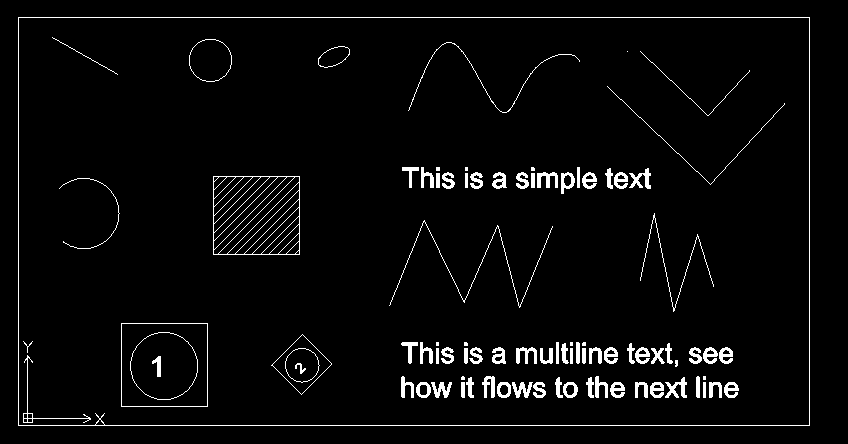
The entities that can be added to an AutoCAD DWG file are:
Supported entities
- Line
- Point
- Polyline
- Circle
- Arc
- Ellipse
- Text
- MText
- Hatch
- Solid
- Block Reference
- Attribute Definition
- 2d Polyline
- 3d Polyline
- Spline
- MLine
- Dimension
- Aligned Dimension
- Rotated Dimension
- MLeader
Entities
All entities (unless noted below) have an Entity Header and such fields listed below as necessary.
Entity Header
| JSON Name | Value | JSON Type |
|---|---|---|
| Type | Entity Type | String |
| Layer | Entity Layer (string with name of Layer Definition) | String |
| Color | Entity Color | See Below |
| Handle | Entity HandleUnique 16 Hexadecimal character string | String |
| Linetype | Entity Line Type (string with name of Line Type Def) | String |
| Normal | Entity Normal (object with x, y and z coordinates) | Object |
Entity Color
The Entity Color can either be an object with a COLORREF definition, a string with ByLayer, ByBlock or an integer from 0 to 256 (as either a string or integer).
Line
| JSON Name | Value | JSON Type |
|---|---|---|
| Start_Point | Start Point | Object with x, y and z coordinates |
| End_Point | End Point | Object with x, y and z coordinates |
Point
| JSON Name | Value | JSON Type |
|---|---|---|
| Position | Position | Object with x, y and z coordinates |
Polyline
| JSON Name | Value | JSON Type |
|---|---|---|
| Closed | Closed Flag | Boolean |
| Constant_Width | Constant Width | Double |
| Vertices | Vertices | Object |
Polyline Vertices
| JSON Name | Value | JSON Type |
|---|---|---|
| Location | Location | Object with x, y and z coordinates |
| Segment_Type | Segment Type | String (default is “Line”) |
| Bulge | Bulge | Double (default is 0.0) |
| Start_Width | Start Width | Object with x, y and z coordinates |
| End_Width | End Width | Object with x, y and z coordinates |
Circle
| JSON Name | Value | JSON Type |
|---|---|---|
| Center | Center | Object with x, y and z coordinates |
| Radius | Radius | Double |
Arc
| JSON Name | Value | JSON Type |
|---|---|---|
| Center | Center | Object with x, y and z coordinates |
| Radius | Radius | Double |
| Start_Angle | Start Angle | Starting Angle in radians |
| End_Angle | End Angle | Ending Angle in radians |
Ellipse
| JSON Name | Value | JSON Type |
|---|---|---|
| Center | Center | Object with x, y and z coordinates |
| Major_Axis | Major Axis | Double |
| Minor_Axis | Minor Axis | Double |
| Radius_Ratio | Radius Ratio | Double (not required) |
| Start_Angle | Start Angle | Starting Angle in radians |
| End_Angle | End Angle | Ending Angle in radians |
Text
| JSON Name | Value | JSON Type |
|---|---|---|
| Text_Height | Text Height | Double |
| Text_String | Contents | String |
| Contents | Contents | String (alias for “Text_String”) |
| Text_Position | Text Position | Object with x, y and z coordinates |
| Text_Location | Text Position | Object (alias for “Text_Position”) |
| Text_Style | Text Style | String (name of Text Style) |
| Rotation | Rotation | Double (in radians) |
| Width_Factor | Width Factor | Double |
| Mirrored_in_X | Mirrored in X Flag | Boolean (default is false) |
| Mirrored_in_Y | Mirrored in Y Flag | Boolean (default is false) |
| Oblique | Slant | Double (in radians) |
| Horizontal_Mode | Horizontal Mode | Integer (see below) |
| Vertical_Mode | Vertical Mode | Integer (see below) |
Text Horizontal Mode Values
Use the values, not the name.
| Name | Value | |
|---|---|---|
| Left | 0 | |
| Center | 1 | |
| Right | 2 | |
| Align | 3 | |
| Mid | 4 | |
| Fit | 5 | |
Text Vertical Mode Values
Use the values, not the name.
| Name | Value | |
|---|---|---|
| Base | 0 | |
| Bottom | 1 | |
| Mid | 2 | |
| Top | 3 |
MText
| JSON Name | Value | JSON Type |
|---|---|---|
| Text_Height | Text Height | Double |
| Text_String | Contents | String |
| Contents | Contents | String (alias for “Text_String”) |
| Text_Position | Text Position | Object with x, y and z coordinates |
| Text_Location | Text Position | Object (alias for “Text_Position”) |
| Text_Style | Text Style | String (name of Text Style) |
| Direction | Direction | Object with x, y and z coordinates |
| Rotation | Rotation | Double (in radians) |
| Height | Height | Double |
| Width | Width | Double |
| Line_Spacing_Factor | Line Spacing | Double |
| Attachment | Attachment Point | Integer (see below) |
| Flow_Direction | Flow Direction | Integer (see below) |
| Show_Borders | Show Borders | Boolean (default is no borders) |
| Background_Fill_Mode | Background Fill Mode | Boolean (default is no fill) |
| Line_Spacing_Style | Line Spacing Style | Integer (see below) |
| Column_Type | Column Type | Integer (see below) |
| Column_Width | Column Width | Double |
| Column_Gutter_Width | Column Gutter Width | Double |
| Column_Flow_Reversed | Column Flow Reversed | Boolean (default is not reversed) |
Attachment Mode Values
Use the values, not the name.
| Name | Value | |
|---|---|---|
| Top Left | 1 | |
| Top Center | 2 | |
| Top Right | 3 | |
| Middle Left | 4 | |
| Middle Center | 5 | |
| Middle Right | 6 | |
| Bottom Left | 7 | |
| Bottom Center | 8 | |
| Bottom Right | 9 | |
| Base Left | 10 | |
| Base Center | 11 | |
| Base Right | 12 | |
| Base Align | 13 | |
| Bottom Align | 14 | |
| Middle Align | 15 | |
| Top Align | 16 | |
| Base Fit | 17 | |
| Bottom Fit | 18 | |
| Middle Fit | 19 | |
| Top Fit | 20 | |
| Base Mid | 21 | |
| Bottom Mid | 22 | |
| Middle Mid | 23 | |
| Top Mid | 24 | |
Flow Direction Values
Use the values, not the name.
| Name | Value | |
|---|---|---|
| Left to Right | 1 (default) | |
| Right to Left | 2 | |
| Top to Bottom | 3 | |
| Bottom to Top | 4 | |
| By Style | 5 |
Line Spacing Style
Use the values, not the name.
| Name | Value | |
|---|---|---|
| At Least | 1 | |
| Exactly | 2 |
Column Type
Use the values, not the name.
| Name | Value | |
|---|---|---|
| No Columns | 0 (Default) | |
| Static Columns | 1 | |
| Dynamic Columns | 2 |
Solid
| JSON Name | Value | JSON Type |
|---|---|---|
| Vertices | Vertices | Array of Objects |
Solid Vertex
| JSON Name | Value | JSON Type |
|---|---|---|
| Vertex | Vertex | Object with x, y and z coordinates |
2D Polyline
| JSON Name | Value | JSON Type |
|---|---|---|
| Closed | Closed Flag | Boolean (Default is not closed) |
| Vertices | Vertices | Array of Objects |
2D Polyline Vertex
| JSON Name | Value | JSON Type |
|---|---|---|
| Vertex | Vertex | Object with x and y coordinates |
3D Polyline
| JSON Name | Value | JSON Type |
|---|---|---|
| Closed | Closed Flag | Boolean (Default is not closed) |
| Vertices | Vertices | Array of Objects |
3D Polyline Vertex
| JSON Name | Value | JSON Type |
|---|---|---|
| Vertex | Vertex | Object with x, y and z coordinates |
Spline
| JSON Name | Value | JSON Type |
|---|---|---|
| Has_Fit_Data | Fit Data Flag | Boolean (Default is no Fit Data) |
| Rational | Rational Flag | Boolean (Default is not rational) |
| Periodic | Periodic Flag | Boolean (Default is not periodic) |
| Closed | Closed Flag | Boolean (Default is not closed) |
| Degree | Degree | Integer |
| Fit_Tolerance | Fit Tolerance | Double |
| Control_Point_Tolerance | Control Point Tolerance | Double |
| Knot_Tolerance | Knot Tolerance | Double |
| Fit_Points | Vertices | Array of Objects |
| Control_Points | Vertices | Array of Objects |
| Knots | Vertices | Array of Doubles |
| Weights | Vertices | Array of Doubles |
| Tangents_Exist | Tangents Exist Flag | Boolean (Default is no tangents) |
| Start_Tangent | Start Tangent | Object with x, y and z vector |
| End_Tangent | End Tangent | Object with x, y and z vector |
Spline Vertex
The same definition is used for Fit Points and Control Points
| JSON Name | Value | JSON Type |
|---|---|---|
| Point | Point | Object with x, y and z coordinates |
Spline Values
The same definition is used for Knots and Weights
| JSON Name | Value | JSON Type |
|---|---|---|
| Value | Value | Double |
Dimension
All dimensions share the following parameters. Some of the specific dimension types, like Aligned and Rotated Dimensions, have extra parameters that are outlined in their sections below.
| JSON Name | Value | JSON Type | Usage |
|---|---|---|---|
| Dimension_Style | Dimension Style | String | name of entry in Dimension Style table |
| DimStyle | Dimension Style | Alias to Dimension_Style | |
| Text_Position | Text Position | Object with x,y, and z coordinates | |
| Dim_Block_Position | Dimension Block Position | Object with x,y, and z coordinates | |
| Is_Default_Text_Position | Default Text Position Flag | Boolean | |
| Dimension_Text | Dimension Text | String | |
| Text_Rotation | Text Rotation | Double in radians | |
| Text_Attachment | Text Attachment | Integer | |
| Text_Line_Spacing_Factor | Text Line Spacing Factor | Double | |
| Horizontal_Rotation | Horizontal Rotation | Double in radians | |
| Dim_Block_Rotation | Dimension Block Rotation | Double in radians | |
| Dim_Block_Scale | Dimension Block Scale | Double | |
| Dimscale | Dimension Scale | Double | |
| Dimgap | Dimension Gap | Double | |
| Background_Text_Color | Background Text Color | Color | |
| Dimension_Linetype | Dimension Linetype | String | Name of LineType |
| First_Extension_Line_Linetype | First Extension Line Linetype | String | Name of LineType |
| Second_Extension_Line_Linetype | Second Extension Line Linetype | String | Name of LineType |
| Extension_Line_Fixed_Length | Extension Line Length | Double | |
| Arrow_First_Is_Flipped | Arrow First Is Flipped Flag | Boolean | |
| Arrow_Second_Is_Flipped | Arrow Second Is Flipped Flag | Boolean | |
| Text_Defined_Width | Text Width | Double | |
| Text_Defined_Height | Text Height | Double | |
| Dimadec | Dimadec | Integer | Number of decimal places in angular dimensions |
| Dimalt | Dimalt | Boolean | Controls the display of alternate measurements |
| Dimaltd | Dimaltd | Integer | Number of decimal places in alternate measurements |
| Dimaltf | Dimaltf | Double | Distance multiplier for alternate measurements |
| Dimrnd | Dimrnd | Double | Specifies the rounding of alternate measurements |
| Dimalttd | Dimalttd | Integer | Specifies the number of decimal places in tolerance values in alternate measurements |
| Dimalttz | Dimalttz | Integer | Controls zero suppression in tolerance values in alternate measurements |
| Dimaltu | Dimaltu | Integer | [Controls the formatting for alternate units](#Dimension-Alternate -Unit-Format) |
| Dimaltz | Dimaltz | Integer | Controls zero suppression in alternate measurements |
| Dimapost | Dimapost | String | Specifies a prefix and/or suffix for the alternate measurements text in dimensions. DIMAPOST is in the form prefix<>suffix. The ‘<>’ in DIMAPOST is replaced by the alternate measurements text. |
| Dimasz | Dimasz | Double | Specifies the size of dimension and leader arrowheads |
| Dimatfit | Dimatfit | Integer | Specifies how arrows and text are placed when they do not fit within the extension lines of dimensions |
| Dimaunit | Dimaunit | Integer | Specifies the formatting for units in angular dimensions |
| Dimazin | Dimazin | Integer | Controls zero suppression in angular dimensions |
| DimBlock | DimBlock | String | Dimension Block Name |
| Dimblk | Dimblk | String | Arrow Head Block Name |
| Dimblk1 | Dimblk1 | String | First arrowhead block when DIMSAH is true |
| Dimblk2 | Dimblk2 | String | Second arrowhead block when DIMSAH is true |
| Dimcen | Dimcen | Double | Controls the generation of arc and circle center marks and lines |
| Dimdec | Dimdec | Integer | Specifies the number of decimal places in primary units |
| Dimdle | Dimdle | Double | Specifies the distance dimension lines extend beyond extension lines |
| Dimdli | Dimdli | Double | Specifies distance between dimension lines for baseline dimensions |
| Dimdsep | Dimdsep | Integer | Specifies the decimal separator (’.’ or ‘,’) |
| Dimexe | Dimexe | Double | Specifies the distance extension lines extend beyond dimension lines |
| Dimexo | Dimexo | Double | Specifies the distance extensions are offset from their origin points |
| Dimfrac | Dimfrac | Integer | Specifies the fraction format when DIMLUNIT is 4 or 5 |
| Dimgap | Dimgap | Double | Specifies the gap between dimension text and dimension lines |
| Dimjust | Dimjust | Integer | Specifies the dimension text horizontal position |
| Dimlfac | Dimlfac | Double | Specifies the distance multiplier for measurements in dimensions |
| Dimlim | Dimlim | Boolean | Controls the display of dimension limits |
| Dimlunit | Dimlunit | Integer | Controls the formatting for units in non-angular dimensions |
| Dimlwd | Dimlwd | Integer | Specifies the lineweight for dimension lines |
| Dimlwe | Dimlwe | Integer | Specifies the lineweight for extension lines |
| Dimpost | Dimpost | String | Specifies a prefix and/or suffix for the measurement text in dimensions. DIMPOST is in the form prefix<>suffix. The ‘<>’ in DIMPOST is replaced by the alternate measurements text. |
| Dimsah | Dimsah | Boolean | Controls the generation of separate arrowheads for dimension lines |
| Dimscale | Dimscale | Double | Scale factor applied to all dimension variables that regulate sizes, offsets, and distances |
| Dimsd1 | Dimsd1 | Boolean | Controls the suppression of the first dimension line and arrowhead |
| Dimsd2 | Dimsd2 | Boolean | Controls the suppression of the second dimension line and arrowhead |
| Dimse1 | Dimse1 | Boolean | Controls the suppression of the first extension line |
| Dimse2 | Dimse2 | Boolean | Controls the suppression of the second extension line |
| Dimsoxd | Dimsoxd | Boolean | Controls the suppression of dimension lines outside the extension lines |
| Dimtad | Dimtad | Integer | Specifies the dimension text vertical position |
| Dimtdec | Dimtdec | Integer | Specifies the number of decimal places in tolerance values for primary units |
| Dimtfac | Dimtfac | Double | Specifies, as a factor of DIMTXT, the size of tolerance and fraction text |
| Dimtih | Dimtih | Boolean | Controls the orientation of dimension text inside the extension lines |
| Dimtix | Dimtix | Boolean | Controls the placement of dimension text inside the extension lines |
| Dimtm | Dimtm | Double | Specifies the negative of the lower tolerance limit |
| Dimtmove | Dimtmove | Integer | Controls the updating of associative dimension objects while dragging |
| Dimtofl | Dimtofl | Boolean | Controls the drawing of dimension lines between extension lines when text is outside the dimension lines |
| Dimtoh | Dimtoh | Boolean | Controls the orientation of dimension text outside the extension lines |
| Dimtol | Dimtol | Boolean | Controls the generation of tolerance text in dimensions |
| Dimtolj | Dimtolj | Integer | Controls the vertical justification of tolerance values with respect to the nominal dimension text |
| Dimtp | Dimtp | Double | Specifies the upper tolerance limit |
| Dimtsz | Dimtsz | Double | Specifies the size of architectural tics |
| Dimtxsty | Dimtxsty | String | Dimension Text Style |
| Dimtvp | Dimtvp | Double | Specifies, as a factor of DIMTXT, the vertical distance of the middle of the dimension text with respect to the dimension line |
| Dimtxt | Dimtxt | Double | Specifies the size of the dimension text |
| Dimtzin | Dimtzin | Integer | Controls zero suppression in tolerance values in linear dimensions |
| Dimupt | Dimupt | Boolean | Controls the movement of user-positioned text when dimension lines are moved |
| Dimzin | Dimzin | Integer | Controls zero suppression in linear dimensions |
| Dimfxl | Dimfxl | Double | Specifies the fixed length of extension lines |
| Dimfxlon | Dimfxlon | Boolean | Controls the generation of fixed-length extension lines |
| Dimjogang | Dimjogang | Double | Specifies the jog angle of dimension lines in jogged radius dimensions |
| Dimtfill | Dimtfill | Integer | Specifies the background fill of dimension text |
| Dimarcsym | Dimarcsym | Integer | Specifies the placement of arc symbols in arc length dimensions |
| Dimltype | Dimltype | String | Specifies the linetype of dimension lines |
| Dimltex1 | Dimltex1 | String | Specifies the linetype of first extension lines |
| Dimltex2 | Dimltex2 | String | Specifies the linetype of second extension lines |
| Dimtxtdirection | Dimtxtdirection | Boolean | Controls the text direction |
| Dimmzf | Dimmzf | Double | |
| Dimmzs | Dimmzs | String | |
| Dimaltmzf | Dimaltmzf | Double | |
| Dimaltmzs | Dimaltmzs | String |
Dimension Alternate Unit Format
| Value | Description |
|---|---|
| 1 | Scientific |
| 2 | Decimal |
| 3 | Engineering |
| 4 | Architectural (stacked) |
| 5 | Fractional (stacked) |
| 6 | Architectural |
| 7 | Fractional |
| 8 | Microsoft Windows Desktop |
Dimension Unit Format
| Value | Description |
|---|---|
| 1 | Scientific |
| 2 | Decimal |
| 3 | Engineering |
| 4 | Architectural (stacked) |
| 5 | Fractional (stacked) |
| 6 | Microsoft Windows Desktop |
Dimension Zero Suppression
| Value | Description |
|---|---|
| 0 | Suppress zero feet and exactly zero inches |
| 1 | Include zero feet and exactly zero inches |
| 2 | Include zero feet and suppress exactly zero inches |
| 3 | Suppress zero feet and include exactly zero inches |
| 4 | Suppress leading decimal zeros |
| 8 | Suppress trailing decimal zeros |
| 12 | Suppress leading and trailing decimal zeros |
Angular Dimension Zero Suppression
| Value | Description |
|---|---|
| 0 | Display leading and trailing decimal zeros |
| 1 | Suppress leading decimal zeros |
| 2 | Suppress trailing decimal zeros |
| 3 | Suppress leading and trailing decimal zeros |
Dimension Arrows Don’t Fit
| Value | Description |
|---|---|
| 0 | Moves text and arrows outside extension lines |
| 1 | Moves arrows, then text, outside extension lines. When DIMTMOVE is 1, a leader is added to moved text |
| 2 | Moves text, then arrows, outside extension lines |
| 3 | Moves text or arrows for best fit |
Angular Dimension Units
| Value | Description |
|---|---|
| 0 | Decimal Degrees |
| 1 | Degrees-Minutes-Seconds |
| 2 | Gradians |
| 3 | Radians |
| 4 | Surveyor’s Units |
Fraction Unit Format
| Value | Description |
|---|---|
| 0 | Horizontal Stacked |
| 1 | Diagonal Stacked |
| 2 | Not Stacked |
Dimension Text Horizontal Position
| Value | Description |
|---|---|
| 0 | Centered above the dimension line |
| 1 | By the first extension line |
| 2 | By the second extension line |
| 3 | Above the dimension line, parallel to the first extension line |
| 4 | Above the dimension line, parallel to the second extension line |
Dimension Text Vertical Position
| Value | Description |
|---|---|
| 0 | Centered about the dimension line |
| 1 | Above the dimension line, unless DIMTIH==1 and the dimension line is not horizontal |
| 2 | Side of the dimension line farthest from the defining points |
| 3 | JIS standard |
| 4 | Text below the dimension line |
Update While Dragging
| Value | Description |
|---|---|
| 0 | Moving dimension text moves the dimension line |
| 1 | Moving dimension text adds a leader |
| 2 | Moving dimension text does not add a leader |
Vertical Justification of Tolerance Values
| Value | Description |
|---|---|
| 0 | Bottom |
| 1 | Middle |
| 2 | Top |
Background Fill of Dimension Text
| Value | Description |
|---|---|
| 0 | No fill |
| 1 | Drawing background color |
| 2 | Color specified by DIMTFILLCLR |
Arc Symbol Placement
| Value | Description |
|---|---|
| 0 | Before the dimension text |
| 1 | Above the dimension text |
| 2 | Not displayed |